
Live Audio Detection & Sampler
Find the key, BPM of any audio source, then record & sample it
The extension for modern sampling! Detect live audio information: Key, BPM, audio quality and more. Then record and download it. The perfect tool for music producers, beatmakers, musicians and DJs.
Available for chrome desktop.
Visit from a desktop computer
to add to chrome.

- Free-to-use
- No registration required
- Neural Key Detection

How it works
-

1. Step Add extension to chrome
-

2. Step Open Supa Sample in the toolbar
-

3. Step Play audio in a browser tab
-

4. Step Key, BPM and quality is
detected using neural models -

5. Step Hit the record button to record
-

6. Step Download the recording with
new analyzed information
Explore features
Discover all features
Discover all the features of Supa Sample by clicking start. Each step of the guided tour will explain each feature in detail
Security & Privacy
- No Data Collection No tracking, no external servers
- Runs Local All analysis runs on your device
-
No-Logs Policy
Browsing history, IP, and personal
data are never stored


FAQ - Frequently asked questions
-
Supa Sample is a free Chrome extension that detects the musical key and BPM of any song playing in a browser tab, and can record the current tab’s audio to a WAV file. It works in real time on YouTube, SoundCloud, Bandcamp, and any site with sound, so music producers and DJs can find a track’s key and tempo without leaving their browser, whether they’re sampling, key matching, or mixing harmonically. All analysis runs on your device. No audio or personal data ever leaves your browser, and no account is needed.
-
Play the song in any tab, click the Supa Sample icon, and it starts analyzing the tab’s audio immediately. Within a few seconds it shows the musical key, BPM, relative and alternative keys, and the audio quality. The longer it listens, the more the reading settles into a confident result.
-
Supa Sample analyzes the tab’s audio in real time using an on-device neural network trained to recognize musical keys, combined with signal processing for tempo. Everything runs locally in your browser, and the audio is never uploaded. Key detection blends a neural model with music-theory rules and votes across time to converge on a stable result.
-
Supa Sample uses a neural network validated across many genres, and its accuracy improves the longer it listens to a track. BPM detection is precise for music with a steady beat. As with any automatic tool, no detector is perfect, and ambiguous or heavily layered tracks are harder to read. That is why Supa Sample also shows relative and alternative keys to help you make the final call.
-
Key detection is hardest at the very start of a track and on songs that share notes with a related key. A song’s relative key (like C major and A minor) uses the exact same notes, so detectors can land on either. That is why Supa Sample shows the relative and alternative keys next to the main one. Give it a few more seconds and the reading usually settles.
-
Supa Sample works in Google Chrome and other Chromium browsers like Microsoft Edge, Brave, and Opera, on any website that plays sound, including YouTube, SoundCloud, Bandcamp, and internet radio. It analyzes whatever audio is playing in the current tab, so you don’t need a special player or file.
-
Yes. Alongside detecting key and BPM, Supa Sample can record the current tab’s audio to a WAV file, ready to reuse in your own projects. Recording is one click, and the file is saved to your own device. Nothing is uploaded.
-
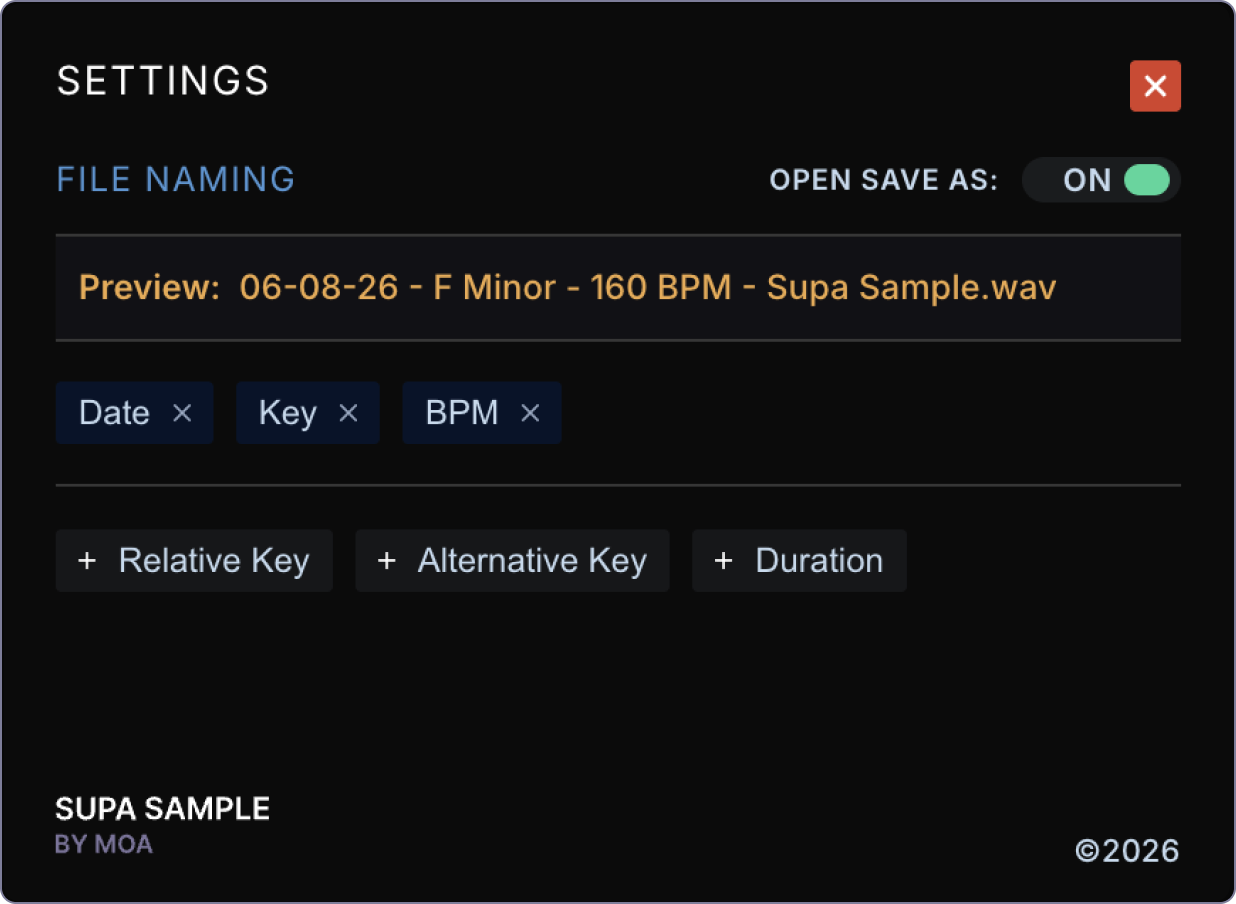
Recordings download to your device as WAV files, and you control the filename. In settings you can build the name from the detected metadata like date, key, and BPM, so a file might save as “F Major - 127 BPM - Supa Sample.wav.” You can also turn on “Open Save As” to choose the exact name and folder each time.
-
It depends on what you record and how you use it. Recording is governed by copyright law and the terms of service of the site you’re using, both of which vary by country. Supa Sample is built for analysis and for capturing audio you have the right to use, for example audio you own or created, royalty-free or Creative Commons tracks, or material you’re licensed to use. You’re responsible for making sure you have the right to record and use any audio, and for respecting copyright and each platform’s terms. Recordings are saved only to your own device, and Supa Sample never uploads, hosts, or shares them.
-
Yes. Supa Sample runs entirely on your device. All key and BPM analysis happens locally in your browser, and no audio, recordings, or personal data is ever sent to us or any third party. The extension makes no external network requests and includes no tracking or analytics.
-
No. Supa Sample works with no sign-up, login, or account of any kind. Install it, click the icon, and start detecting.
-
Yes, Supa Sample is free to install and use from the Chrome Web Store.
-
First, make sure audio is actually playing in the tab and the tab isn’t muted. If it stays on “listening,” click the rescan button, or close and reopen the extension. Detection needs a few seconds of clear audio to lock on, so silent or very quiet intros won’t produce a result until the music starts.
If you have any other questions,
feel free to contact us
